🚀 Get Started
Step 2 · Choose Payment Method
Cremonix supports two secure payment methods for your monthly subscription.
Select the option that best fits your preferences.
⚙️ Setting up your secure payment environment...
Preparing your plan and payment details...
Step 3 · Configure Telegram
Connect your Telegram account to receive real-time trading alerts from Cremonix. Click below to link it — then return here when done.
 Configure Telegram for Alerts
Install Telegram then return to this page.
- No withdrawal access — Cremonix cannot move funds off Kraken
- Trade-only permissions — Create & Modify Orders, Query only
- Keys encrypted at rest — never stored in plain text
- Revoke anytime from your Kraken API settings
Connect exchange
 Kraken
- Log in to Kraken and go to API Settings.
-
Create a new API key with these permissions:
- Funds — Query
- Orders & Trades — Query Open & Closed, Create & Modify, Cancel
- Data — Query & Export
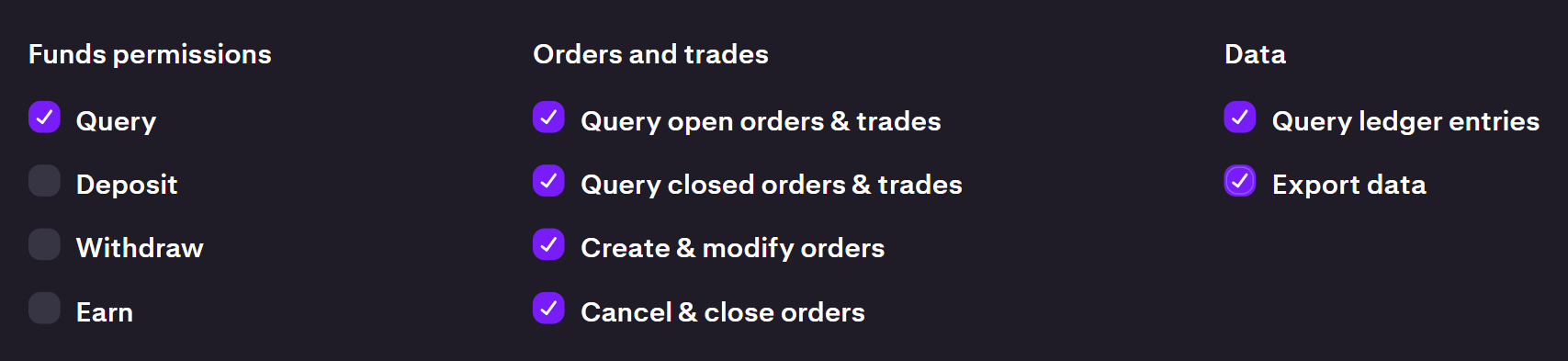 Required Kraken API permissions
- Click Generate Keys, then paste both keys below.
⚙️ Validating your Kraken connection...
This may take up to 30 seconds while we verify your API keys and configure your account.
Please do not close this window📩 Sending verification email...
Welcome to Cremonix
Automated, ML-designed AI crypto trading — now active.
🎉 Congratulations — your Cremonix account is live!
Your API connection to Kraken has been verified. When you're ready, click the
Bot is Paused button on your dashboard to start hunting for trades.
Once enabled, and your account is funded with ,
BTC, or ETH, the bot will execute trades automatically
— powered by Cremonix Intelligence.
⚙️ Safety First: Any existing BTC or ETH in your Kraken account
is marked as Not Usable by default — you control what the bot can trade.
📩 You'll receive a Telegram alert when the bot enters its first live trade.